
Introduction
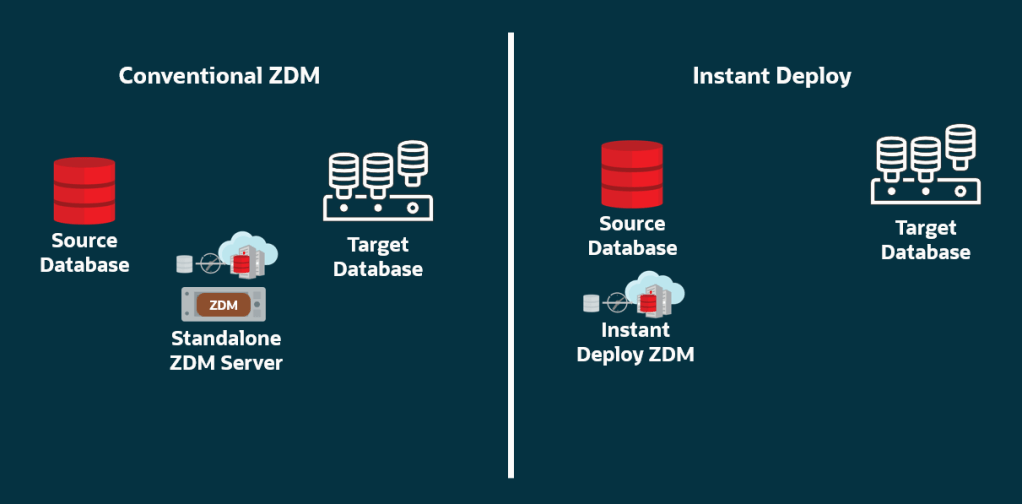
Oracle ZDM 26.1 introduced Instant Deploy, which allows you to use the ZDM software on the source or target database host without a software installation.
This blog post provides an example of using Instant Deploy on the source database host for a Physical Online migration. Since the focus is on Instant Deploy, this blog post does not cover the prerequisites for the Physical Online migration.
The Environment
For demonstration purposes, I will be using OCI Oracle Base Database Service with Oracle AI Database 26ai, version 23.26.2.0.0.
- Source: hostname: hostsrc, IP: 10.10.0.214, DB name: ORADB, DB unique name: ORADB_src
SQL> select name, db_unique_name, database_role from v$database;

NAME      DB_UNIQUE_NAME                 DATABASE_ROLE
--------- ------------------------------ ----------------
ORADB     ORADB_src                      PRIMARY
- Target: hostname: hosttgt, IP: 10.10.0.45, DB name: ORADB, DB unique name: ORADB_tgt
SQL> select name, db_unique_name, database_role from v$database;

NAME      DB_UNIQUE_NAME                 DATABASE_ROLE
--------- ------------------------------ ----------------
ORADB     ORADB_tgt                      PRIMARY
The Migration
Step 1: Download the latest ZDM main release version from the Oracle ZDM product page (version 26.1). For any following patching (e.g., 26.2), check My Oracle Support (MOS) by searching for patch number 33509650 in the “Patches & Updates” tab.
Step 2. Copy the V1055491-01.zip file (1,125,684,981 bytes) to a directory with sufficient free storage. In this case:
[opc@hostsrc ~]$ sudo mkdir /opt/opc/zdm/
[opc@hostsrc ~]$ sudo chown opc:opc /opt/opc/zdm/
#copy to this directory via WinSCP
Unzip the file:
[opc@hostsrc ~]$ cd /opt/opc/zdm/
[opc@hostsrc zdm]$ unzip V1055491-01.zip
This will create the zdm26.1 sub directory. Hence, the ZDM software is in the /opt/opc/zdm/zdm26.1 directory.
Step 3: Exchange the source and target host names in the /etc/hosts files.
Add the source hostname and IP information to the /etc/hosts file of the target host.
#on source host
[opc@hostsrc ~]$ cat /etc/hosts
10.10.0.214  hostsrc.subnetpublic.vcnfra.oraclevcn.com  hostsrc
10.10.0.214  hostsrc-scan.subnetpublic.vcnfra.oraclevcn.com  hostsrc-scan
#on target host
[opc@hosttgt ~]$ sudo vi /etc/hosts
Add the target hostname and IP information to the /etc/hosts file of the source host.
#on target host
[opc@hosttgt ~]$ cat /etc/hosts
10.10.0.45  hosttgt.subnetpublic.vcnfra.oraclevcn.com  hosttgt
10.10.0.45  hosttgt-scan.subnetpublic.vcnfra.oraclevcn.com  hosttgt-scan
#on source host
[opc@hostsrc ~]$ sudo vi /etc/hosts
Step 4: Copy the SSH public key for your OS user (in this case, opc) on the source host and add it to the authorized_keys file for the OS user (in this case, also opc) on the target host.
#on source host
[opc@hostsrc ~]$ cat .ssh/id_rsa.pub
#on target host
[opc@hosttgt ~]$ vi .ssh/authorized_keys
Test the SSH connectivity from the source to the target database host:
[opc@hostsrc ~]$ ssh opc@hosttgt
Last login: Mon Jun  1 12:18:29 2026 from 10.10.0.214
[opc@hosttgt ~]$
Verify that TTY is disabled for the SSH-privileged user. If TTY is disabled, the following command returns the date from the remote host without any errors:
[opc@hostsrc ~]$ ssh -i /home/opc/.ssh/id_rsa opc@hosttgt "/usr/bin/sudo /bin/sh -c date"
Mon Jun  1 12:20:02 UTC 2026
Step 5: Evaluate the migration. On the source host:
[opc@hostsrc ~]$ /opt/opc/zdm/zdm26.1/zdmcli migrate database -sourcedb ORADB_src -targetdb ORADB_tgt -targetnode hosttgt -eval

Performing one-time ZDM binary setup... This may take a few minutes.
ZDM binary setup completed successfully.
Enter source database ORADB_src SYS password:
Migration evaluation job started
Result file path: /opt/opc/zdm/zdm26.1/zdmbase/chkbase/scheduled/job-1-<date>.log
======================JOB_EXECUTION_DETAILS_START======================
...
####################################################################
hostsrc: <date> : Oracle ZDM ONLINE PHYSICAL evaluation job completed
hostsrc: <date> : Job duration: 1 minutes and 15 seconds
The output file path contains the job id, in this case 1, that can be used to query the job status afterward as well if needed:
[opc@hostsrc ~]$ /opt/opc/zdm/zdm26.1/zdmcli query job -jobid 1
Job ID: 1
User: opc
Job Type: "EVAL"
Scheduled job command: "zdmcli migrate database -sourcedb ORADB_src -targetdb ORADB_tgt -targetnode hosttgt -eval"
Current status: SUCCEEDED
Result file path: "/opt/opc/zdm/zdm26.1/zdmbase/chkbase/scheduled/job-1-<date>.log"
Job execution elapsed time: 1 minutes 15 seconds
ZDM_GET_SRC_INFO ........... PRECHECK_PASSED
ZDM_GET_TGT_INFO ........... PRECHECK_PASSED
ZDM_PRECHECKS_SRC .......... PRECHECK_PASSED
ZDM_PRECHECKS_TGT .......... PRECHECK_PASSED
ZDM_SETUP_SRC .............. PRECHECK_PASSED
ZDM_SETUP_TGT .............. PRECHECK_PASSED
ZDM_PREUSERACTIONS ......... PRECHECK_PASSED
ZDM_PREUSERACTIONS_TGT ..... PRECHECK_PASSED
ZDM_VALIDATE_SRC ........... PRECHECK_PASSED
ZDM_VALIDATE_TGT ........... PRECHECK_PASSED
ZDM_POSTUSERACTIONS ........ PRECHECK_PASSED
ZDM_POSTUSERACTIONS_TGT .... PRECHECK_PASSED
ZDM_CLEANUP_SRC ............ PRECHECK_PASSED
ZDM_CLEANUP_TGT ............ PRECHECK_PASSED
Step 6: Migrate. On the source host:
[opc@hostsrc ~]$ /opt/opc/zdm/zdm26.1/zdmcli migrate database -sourcedb ORADB_src -targetdb ORADB_tgt -targetnode hosttgt
Enter source database ORADB_src SYS password:
Migration job started ....
Result file path: /opt/opc/zdm/zdm26.1/zdmbase/chkbase/scheduled/job-2-<date>.log
======================JOB_EXECUTION_DETAILS_START======================
...
####################################################################
hostsrc: 2026-06-01T13:05:19.398Z : Oracle ZDM ONLINE PHYSICAL migration completed
hostsrc: 2026-06-01T13:05:19.399Z : Job duration: 16 minutes and 55 seconds
The output file path contains the job id, in this case 2, that can be used to query the job status afterward as well if needed:
Job ID: 4
User: opc
Job Type: "MIGRATE"
Scheduled job command: "zdmcli migrate database -sourcedb ORADB_src -targetdb ORADB_tgt -targetnode hosttgt"
Current status: SUCCEEDED
Result file path: "/opt/opc/zdm/zdm26.1/zdmbase/chkbase/scheduled/job-2-<date>.log"
Job execution elapsed time: 16 minutes 55 seconds
ZDM_GET_SRC_INFO ................ COMPLETED
ZDM_GET_TGT_INFO ................ COMPLETED
ZDM_PRECHECKS_SRC ............... COMPLETED
ZDM_PRECHECKS_TGT ............... COMPLETED
ZDM_SETUP_SRC ................... COMPLETED
ZDM_SETUP_TGT ................... COMPLETED
ZDM_PREUSERACTIONS .............. COMPLETED
ZDM_PREUSERACTIONS_TGT .......... COMPLETED
ZDM_VALIDATE_SRC ................ COMPLETED
ZDM_VALIDATE_TGT ................ COMPLETED
ZDM_DISCOVER_SRC ................ COMPLETED
ZDM_COPYFILES ................... COMPLETED
ZDM_PREPARE_TGT ................. COMPLETED
ZDM_SETUP_TDE_TGT ............... COMPLETED
ZDM_RESTORE_TGT ................. COMPLETED
ZDM_RECOVER_TGT ................. COMPLETED
ZDM_FINALIZE_TGT ................ COMPLETED
ZDM_CONFIGURE_DG_SRC ............ COMPLETED
ZDM_SWITCHOVER_SRC .............. COMPLETED
ZDM_SWITCHOVER_TGT .............. COMPLETED
ZDM_POST_DATABASE_OPEN_TGT ...... COMPLETED
ZDM_DATAPATCH_TGT ............... COMPLETED
ZDM_UPDATE_PLATFORM_METADATA .... COMPLETED
ZDM_POST_MIGRATE_TGT ............ COMPLETED
ZDM_POSTUSERACTIONS ............. COMPLETED
ZDM_POSTUSERACTIONS_TGT ......... COMPLETED
ZDM_CLEANUP_SRC ................. COMPLETED
ZDM_CLEANUP_TGT ................. COMPLETED
Step 7: Confirm the Instant Deploy mode is used (ZDM service is NOT running and the mode is Serverless).
[opc@hostsrc ~]$ /opt/opc/zdm/zdm26.1/zdmhome/bin/zdmservice status
---------------------------------------
        Service Status
---------------------------------------
 Running:       false
 Tranferport:
 Conn String:   jdbc:derby:/opt/opc/zdm/zdm26.1/zdmbase/derbyRepo;create=true
 Repo Path:     /opt/opc/zdm/zdm26.1/zdmbase/derbyRepo
 SSH port:      22
 Wallet path:   /opt/opc/zdm/zdm26.1/zdmbase/crsdata/hostsrc/security
 Mode :         Serverless
Further Reading
- Performing Migration Using the Instant Deploy Feature – documentation
- Zero Downtime Migration Release Notes – What’s new in 26.1
- Oracle Zero Downtime Migration Technical Brief – 26.1
- Move to Oracle Cloud Using Zero Downtime Migration – documentation 26.1
- Zero Downtime Migration (ZDM) – Physical Online Migration using Data Guard – blog post

