
Introduction
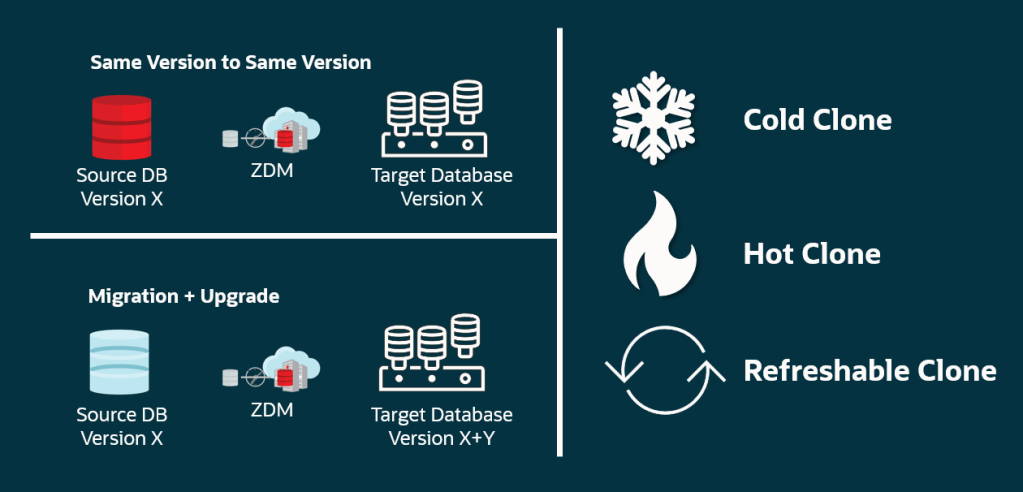
Oracle ZDM 26.1 introduced the PDB Cloning migration workflow, which includes cold, hot and refreshable PDB cloning options.
This blog post provides an example of using refreshable PDB cloning.
The Environment
For demonstration purposes, I will be using OCI Oracle Base Database Service with Oracle AI Database 26ai, version 23.26.2.0.0.
- Source: hostname: host26ad1, IP: 10.10.0.99, DB name: CDB26, DB unique name: CDB26_ad1, PDB name: PDBAD1
SQL> set lines 300
col pdb_name for a15
col refresh_mode for a15
select con_id, pdb_name, status, refresh_mode, refresh_interval from dba_pdbs;SQL> SQL> SQL>

    CON_ID PDB_NAME        STATUS     REFRESH_MODE    REFRESH_INTERVAL
---------- --------------- ---------- --------------- ----------------
         3 PDBAD1          NORMAL     NONE
- Target: hostname: host26ad2, IP: 10.10.0.7, DB name: CDB26, DB unique name: CDB26_ad2
SQL> set lines 300
col pdb_name for a15
col refresh_mode for a15
select con_id, pdb_name, status, refresh_mode, refresh_interval from dba_pdbs;SQL> SQL> SQL>

    CON_ID PDB_NAME        STATUS     REFRESH_MODE    REFRESH_INTERVAL
---------- --------------- ---------- --------------- ----------------
         2 PDB$SEED        NORMAL     NONE
- ZDM Service host: hostname: zdm26
The Migration
Step 1: Add the source and target host names to the /etc/hosts files on the ZDM host.
#on source host
[opc@host26ad1 ~]$ cat /etc/hosts
10.10.0.99  host26ad1.subnetpublic.vcnfra.oraclevcn.com  host26ad1
10.10.0.99  host26ad1-scan.subnetpublic.vcnfra.oraclevcn.com  host26ad1-scan
#on target host
[opc@host26ad2 ~]$ cat /etc/hosts
10.10.0.7  host26ad2.subnetpublic.vcnfra.oraclevcn.com  host26ad2
10.10.0.7  host26ad2-scan.subnetpublic.vcnfra.oraclevcn.com  host26ad2-scan
#on the ZDM host
[opc@zdm26 ~]$ sudo vi /etc/hosts
Additionally, add the source hostname to the /etc/hosts file on the target host, and vice versa.
[opc@host26ad1 ~]$ sudo vi /etc/hosts
[opc@host26ad2 ~]$ sudo vi /etc/hosts
Step 2: Copy the SSH public key for your ZDM user (in this case, zdmuser) on the ZDM host and add it to the authorized_keys file for the OS user (in this case, opc) on the source and target hosts.
#on ZDM host
[zdmuser@zdm26 ~]$ cat .ssh/id_rsa.pub
#on source and target hosts
[opc@host26ad1 ~]$ vi .ssh/authorized_keys
[opc@host26ad2 ~]$ vi .ssh/authorized_keys
Step 3: Create the response file on the ZDM host with the following content.
[zdmuser@zdm26 ~]$ vi /home/zdmuser/refr_pdb_clone.rsp
TGT_DB_UNIQUE_NAME=CDB26_ad2
MIGRATION_METHOD=ONLINE_PHYSICAL
DATA_TRANSFER_MEDIUM=DBLINK
PLATFORM_TYPE=VMDB
ZDM_PDB_CLONE_METHOD=REFRESHABLE
ZDM_SRC_PDB_NAME=PDBAD1
ZDM_TGT_PDB_NAME=AD1C1
ZDM_PDB_REFRESH_INTERVAL=2
ZDM_SWITCHOVER=FALSE
Step 4: Evaluate the migration. On the ZDM host:
[zdmuser@zdm26 ~]$ $ZDMHOME/bin/zdmcli migrate database \
-rsp /home/zdmuser/refr_pdb_clone.rsp \
-sourcedb CDB26_ad1 \
-sourcenode host26ad1 \
-srcauth zdmauth \
-srcarg1 user:opc \
-srcarg2 identity_file:/home/zdmuser/.ssh/id_rsa \
-srcarg3 sudo_location:/usr/bin/sudo \
-targetnode host26ad2 \
-tgtauth zdmauth \
-tgtarg1 user:opc \
-tgtarg2 identity_file:/home/zdmuser/.ssh/id_rsa \
-tgtarg3 sudo_location:/usr/bin/sudo \
-targethome /u01/app/oracle/product/23.0.0.0/dbhome_1 \
-tgttdekeystorepasswd \
-eval

Enter source database CDB26_ad1 SYS password:
Enter target container database TDE keystore password:
Operation "zdmcli migrate database" scheduled with the job ID "1".
Check the job status:
[zdmuser@zdm26 ~]$ $ZDMHOME/bin/zdmcli query job -jobid 1
Job ID: 1
User: zdmuser
Job Type: "EVAL"
Current status: SUCCEEDED
Result file path: "/home/zdmuser/zdmbase/chkbase/scheduled/job-1-<date>.log"
Job execution elapsed time: 1 minutes 58 seconds
ZDM_GET_SRC_INFO ........... PRECHECK_PASSED
ZDM_GET_TGT_INFO ........... PRECHECK_PASSED
ZDM_PRECHECKS_SRC .......... PRECHECK_PASSED
ZDM_PRECHECKS_TGT .......... PRECHECK_PASSED
ZDM_SETUP_SRC .............. PRECHECK_PASSED
ZDM_SETUP_TGT .............. PRECHECK_PASSED
ZDM_PREUSERACTIONS ......... PRECHECK_PASSED
ZDM_PREUSERACTIONS_TGT ..... PRECHECK_PASSED
ZDM_VALIDATE_SRC ........... PRECHECK_PASSED
ZDM_VALIDATE_TGT ........... PRECHECK_PASSED
ZDM_POSTUSERACTIONS ........ PRECHECK_PASSED
ZDM_POSTUSERACTIONS_TGT .... PRECHECK_PASSED
ZDM_CLEANUP_SRC ............ PRECHECK_PASSED
ZDM_CLEANUP_TGT ............ PRECHECK_PASSED
Step 5: Initiate the migration and use the -pauseafter option to stop the migration after the ZDM_CLONE_PDB_TGT phase. This is where the changes on the source PDB are synchronized to the target PDB every x minutes, as specified by the ZDM_PDB_REFRESH_INTERVAL parameter.
[zdmuser@zdm26 ~]$ $ZDMHOME/bin/zdmcli migrate database \
-rsp /home/zdmuser/refr_pdb_clone.rsp \
-sourcedb CDB26_ad1 \
-sourcenode host26ad1 \
-srcauth zdmauth \
-srcarg1 user:opc \
-srcarg2 identity_file:/home/zdmuser/.ssh/id_rsa \
-srcarg3 sudo_location:/usr/bin/sudo \
-targetnode host26ad2 \
-tgtauth zdmauth \
-tgtarg1 user:opc \
-tgtarg2 identity_file:/home/zdmuser/.ssh/id_rsa \
-tgtarg3 sudo_location:/usr/bin/sudo \
-targethome /u01/app/oracle/product/23.0.0.0/dbhome_1 \
-tgttdekeystorepasswd \
-pauseafter ZDM_CLONE_PDB_TGT

Enter source database CDB26_ad1 SYS password:
Enter target container database TDE keystore password:
Operation "zdmcli migrate database" scheduled with the job ID "2".
Check the job status:
[zdmuser@zdm26 ~]$ $ZDMHOME/bin/zdmcli query job -jobid 2
Job ID: 28
User: zdmuser
Job Type: "MIGRATE"
Current status: PAUSED
Current Phase: "ZDM_CLONE_PDB_TGT"
Result file path: "/home/zdmuser/zdmbase/chkbase/scheduled/job-2-<date>.log"
Job execution elapsed time: 3 minutes 40 seconds
ZDM_GET_SRC_INFO .............. COMPLETED
ZDM_GET_TGT_INFO .............. COMPLETED
ZDM_PRECHECKS_SRC ............. COMPLETED
ZDM_PRECHECKS_TGT ............. COMPLETED
ZDM_SETUP_SRC ................. COMPLETED
ZDM_SETUP_TGT ................. COMPLETED
ZDM_PREUSERACTIONS ............ COMPLETED
ZDM_PREUSERACTIONS_TGT ........ COMPLETED
ZDM_VALIDATE_SRC .............. COMPLETED
ZDM_VALIDATE_TGT .............. COMPLETED
ZDM_DISCOVER_SRC .............. COMPLETED
ZDM_COPYFILES ................. COMPLETED
ZDM_PREPARE_TGT ............... COMPLETED
ZDM_CLONE_PDB_TGT ............. COMPLETED
ZDM_FINALIZE_TGT .............. PENDING
ZDM_SWITCHOVER_TGT ............ PENDING
ZDM_SWITCHOVER_SRC ............ PENDING
ZDM_NONCDBTOPDB_CONVERSION .... PENDING
ZDM_DATAPATCH_TGT ............. PENDING
ZDM_POST_DATABASE_OPEN_TGT .... PENDING
ZDM_POSTUSERACTIONS ........... PENDING
ZDM_POSTUSERACTIONS_TGT ....... PENDING
ZDM_CLEANUP_SRC ............... PENDING
ZDM_CLEANUP_TGT ............... PENDING

Pause After Phase: "ZDM_CLONE_PDB_TGT"
Check the PDB status on the target database:
SQL> set lines 300
col pdb_name for a15
col refresh_mode for a15
select con_id, pdb_name, status, refresh_mode, refresh_interval from dba_pdbs;

    CON_ID PDB_NAME        STATUS     REFRESH_MODE    REFRESH_INTERVAL
---------- --------------- ---------- --------------- ----------------
         3 AD1C1           REFRESHING AUTO                           2
         2 PDB$SEED        NORMAL     NONE
Step 6: Resume the job once you are ready to switch over your application. On the ZDM host.
[zdmuser@zdm26 ~]$ $ZDMHOME/bin/zdmcli resume job -jobid 2
Check the job status:
[zdmuser@zdm26 ~]$ $ZDMHOME/bin/zdmcli query job -jobid 2
Job ID: 28
User: zdmuser
Job Type: "MIGRATE"
Current status: SUCCEEDED
Current Phase: "ZDM_CLONE_PDB_TGT"
Result file path: "/home/zdmuser/zdmbase/chkbase/scheduled/job-2-<date>.log"
Job execution elapsed time: 3 minutes 40 seconds
ZDM_GET_SRC_INFO .............. COMPLETED
ZDM_GET_TGT_INFO .............. COMPLETED
ZDM_PRECHECKS_SRC ............. COMPLETED
ZDM_PRECHECKS_TGT ............. COMPLETED
ZDM_SETUP_SRC ................. COMPLETED
ZDM_SETUP_TGT ................. COMPLETED
ZDM_PREUSERACTIONS ............ COMPLETED
ZDM_PREUSERACTIONS_TGT ........ COMPLETED
ZDM_VALIDATE_SRC .............. COMPLETED
ZDM_VALIDATE_TGT .............. COMPLETED
ZDM_DISCOVER_SRC .............. COMPLETED
ZDM_COPYFILES ................. COMPLETED
ZDM_PREPARE_TGT ............... COMPLETED
ZDM_CLONE_PDB_TGT ............. COMPLETED
ZDM_FINALIZE_TGT .............. COMPLETED
ZDM_SWITCHOVER_TGT ............ COMPLETED
ZDM_SWITCHOVER_SRC ............ COMPLETED
ZDM_NONCDBTOPDB_CONVERSION .... COMPLETED
ZDM_DATAPATCH_TGT ............. COMPLETED
ZDM_POST_DATABASE_OPEN_TGT .... COMPLETED
ZDM_POSTUSERACTIONS ........... COMPLETED
ZDM_POSTUSERACTIONS_TGT ....... COMPLETED
ZDM_CLEANUP_SRC ............... COMPLETED
ZDM_CLEANUP_TGT ............... COMPLETED
Check the PDB status on the target database:
SQL> set lines 300
col pdb_name for a15
col refresh_mode for a15
select con_id, pdb_name, status, refresh_mode, refresh_interval from dba_pdbs;

    CON_ID PDB_NAME        STATUS     REFRESH_MODE    REFRESH_INTERVAL
---------- --------------- ---------- --------------- ----------------
         3 AD1C1           NORMAL     NONE
         2 PDB$SEED        NORMAL     NONE
Step 7: In case of a test migration, use the following commands to delete the target PDB.
SQL> alter pluggable database AD1C1 close immediate;
SQL> drop pluggable database AD1C1 including datafiles;
Further Reading
- Migration Using PDB Clone – documentation
- Zero Downtime Migration Release Notes – What’s new in 26.1
- Oracle Zero Downtime Migration Technical Brief – 26.1
- Move to Oracle Cloud Using Zero Downtime Migration – documentation 26.1

