
Introduction
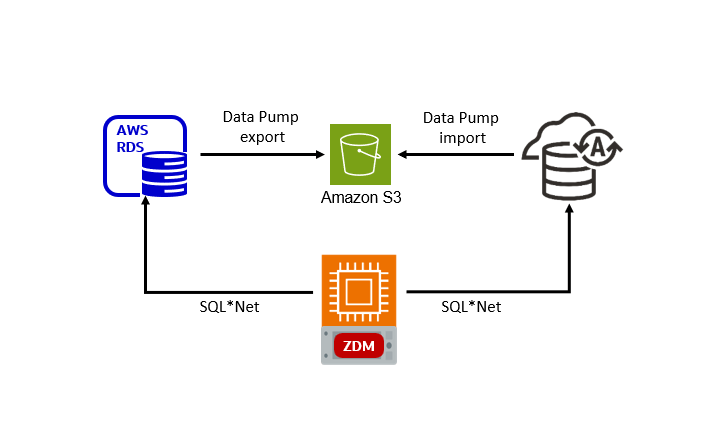
This blog post describes the steps to migrate from Oracle RDS to Autonomous Database using Oracle Zero Downtime Migration (ZDM) logical offline method, which leverages Oracle Data Pump for data export and import and uses Amazon S3 Object Storage to store the Data Pump dump files.
The Environment
- Source Database: Oracle RDS.
- Target Database: Autonomous Database.
- Intermediate Storage Location: Amazon S3 Object Storage bucket.
- Oracle ZDM: installed on an AWS EC2 VM instance with RHEL 8.
Step 1: Download and Install Oracle ZDM
Download and install the Oracle ZDM software on an AWS EC2 VM instance following the steps in Setting Up Zero Downtime Migration Software or Part 1/5: Zero Downtime Migration (ZDM) – Introduction & Installation.
Step 2: Get your Access and Secret Keys for the S3 Bucket
You will need to provide ZDM access to the S3 to be able to upload the Data Pump export file to the object storage bucket.
Follow the AWS documentation or the example in Steps 1 and 2 in this blog post to get your Access Key ID and Secret Access Key. These should look like this:
Access key ID: AKIA2PCQOXHEFKTB6SU2
Secret access key: 7MymZxpyL3NDJeNpMrfuDE8FJ1fp70BNpsP2Le9b
Step 3: Enable your RDS Instance to Access the S3 Bucket
Review the conditions and follow the steps in the AWS documentation to allow your RDS instance to access the S3 bucket.
Step 4: Check Access from Autonomous Database to S3 Bucket
Create the credentials using the DBMS_CLOUD PL/SQL package to access the S3 objects. Use the Access Keys from step 2:
BEGIN
    DBMS_CLOUD.CREATE_CREDENTIAL(
        credential_name => '<Crednedial_Name>',
        username => '<Access_Key_ID>',
        password => '<Secret_Access_Key>'
    );
END;
/

-- in this example
SQL> BEGIN
      DBMS_CLOUD.CREATE_CREDENTIAL(
          credential_name => 'AWSCRED',
          username => 'AKIA2PCQOXHEFKTB6SU2',
          password => '7MymZxpyL3NDJeNpMrfuDE8FJ1fp70BNpsP2Le9b'
      );
  END;
  /

PL/SQL procedure successfully completed.
To test the access to the S3 bucket, list the files using the LIST_OBJECTS function of the DBMS_CLOUD package.
set lines 300
col OBJECT_NAME for a50
select OBJECT_NAME from dbms_cloud.list_objects('AWSCRED', 'https://s3zdm.s3.us-east-1.amazonaws.com');
Step 5: Configure the Source RDS Database for Data Pump
For optimal Data Pump performance during offline logical migrations, it is recommended to set the STREAMS_POOL_SIZE database parameter to a minimum of 256MB-350MB.
Set the parameter in your RDS parameter group:
STREAMS_POOL_SIZE=268435456 --(=256MB)
Step 6: Create the ZDM Response File
Create a new response file on the ZDM host. Here is an example with the minimum parameters required. As zdmuser:
[zdmuser@zdmhost ~]$ vi logical_offline.rsp
# migration method
MIGRATION_METHOD=OFFLINE_LOGICAL
DATA_TRANSFER_MEDIUM=AMAZONS3
# AWS RDS Oracle
SOURCEDATABASE_ENVIRONMENT_NAME=AMAZON
SOURCEDATABASE_ENVIRONMENT_DBTYPE=RDS_ORACLE
SOURCEDATABASE_ADMINUSERNAME=admin
SOURCEDATABASE_CONNECTIONDETAILS_HOST=orards2.cvi2oskioo1c.us-east-1.rds.amazonaws.com
SOURCEDATABASE_CONNECTIONDETAILS_SERVICENAME=ORCL
SOURCEDATABASE_CONNECTIONDETAILS_PORT=1521
# data pump
DATAPUMPSETTINGS_EXPORTDIRECTORYOBJECT_NAME=DATA_PUMP_DIR
DATAPUMPSETTINGS_JOBMODE=SCHEMA
DATAPUMPSETTINGS_METADATAREMAPS-1=type:REMAP_TABLESPACE,oldValue:USERS,newValue:DATA
INCLUDEOBJECTS-1=owner:HR
# target db
TARGETDATABASE_OCID=ocid1.autonomousdatabase.oc1.iad.xxx
TARGETDATABASE_ADMINUSERNAME=ADMIN
# oci cli
OCIAUTHENTICATIONDETAILS_USERPRINCIPAL_USERID=ocid1.user.oc1..xxx
OCIAUTHENTICATIONDETAILS_USERPRINCIPAL_TENANTID=ocid1.tenancy.oc1..xxx
OCIAUTHENTICATIONDETAILS_USERPRINCIPAL_FINGERPRINT=43:05:e5:1f:63:8a:29:f3:02:67:ff:56:57:e3:bc:33
OCIAUTHENTICATIONDETAILS_USERPRINCIPAL_PRIVATEKEYFILE=/home/zdmuser/.oci/oci_api_key.pem
OCIAUTHENTICATIONDETAILS_REGIONID=us-ashburn-1
# s3 credentials
DUMPTRANSFERDETAILS_S3BUCKET_NAME=s3zdm
DUMPTRANSFERDETAILS_S3BUCKET_REGION=us-east-1
DUMPTRANSFERDETAILS_S3BUCKET_ACCESSKEY=AKIA2PCQOXHEFKTB6SU2
The OCI CLI parameters are required for ZDM to download the Autonomous Database credentials (the wallet file). If you didn’t install OCI CLI on the ZDM host, or it’s not possible to make HTTPS over port 443 calls to an OCI REST endpoint, then download the Autonomous Database credentials wallet and unzip it on the ZDM host. In the parameter file:
# skip the following parameters
TARGETDATABASE_OCID
OCIAUTHENTICATIONDETAILS_*

# and add the following parameters
TARGETDATABASE_DBTYPE=ADBCC
TARGETDATABASE_CONNECTIONDETAILS_HOST=example.adb.us-ashburn-1.oraclecloud.com
TARGETDATABASE_CONNECTIONDETAILS_PORT=1521
TARGETDATABASE_CONNECTIONDETAILS_SERVICENAME=adbzdm_high.atp.oraclecloud.com
TARGETDATABASE_CONNECTIONDETAILS_TLSDETAILS_CREDENTIALSLOCATION=/home/zdmuser/adbwallet
TABLESPACEDETAILS_EXCLUDE=UNDOTBS1,UNDO_2
Step 7: Evaluate the Migration
On the ZDM host, as zdmuser:
[zdmuser@zdmhost ~]$ $ZDMHOME/bin/zdmcli migrate database -rsp logical_offline.rsp -eval
You will interactively be asked to enter the passwords for the RDS and Autonomous Database admin users and the password for the S3 bucket access (the Secret access key, in this example 7MymZxpyL3NDJeNpMrfuDE8FJ1fp70BNpsP2Le9b).
Check the job status. On the ZDM host, as zdmuser:
[zdmuser@zdmhost ~]$ $ZDMHOME/bin/zdmcli query job -jobid 1
Job ID: 1
Job Type: "EVAL"
Current status: SUCCEEDED
ZDM_VALIDATE_TGT ...................... COMPLETED
ZDM_VALIDATE_SRC ...................... COMPLETED
ZDM_VALIDATE_DATAPUMP_SETTINGS_SRC .... COMPLETED
ZDM_VALIDATE_DATAPUMP_SETTINGS_TGT .... COMPLETED
ZDM_PREPARE_DATAPUMP_SRC .............. COMPLETED
ZDM_DATAPUMP_ESTIMATE_SRC ............. COMPLETED
Step 8: Start the Migration
Execute the same command for evaluation, but this time without the -eval parameter. On the ZDM host, as zdmuser:
[zdmuser@zdmhost ~]$ $ZDMHOME/bin/zdmcli migrate database -rsp logical_offline.rsp
Check the job status. On the ZDM host, as zdmuser:
[zdmuser@zdmhost ~]$ $ZDMHOME/bin/zdmcli query job -jobid 2
Job ID: 2
Job Type: "MIGRATE"
Current status: SUCCEEDED
ZDM_VALIDATE_TGT ...................... COMPLETED
ZDM_VALIDATE_SRC ...................... COMPLETED
ZDM_VALIDATE_DATAPUMP_SETTINGS_SRC .... COMPLETED
ZDM_VALIDATE_DATAPUMP_SETTINGS_TGT .... COMPLETED
ZDM_PREPARE_DATAPUMP_SRC .............. COMPLETED
ZDM_DATAPUMP_ESTIMATE_SRC ............. COMPLETED
ZDM_PREPARE_DATAPUMP_TGT .............. COMPLETED
ZDM_DATAPUMP_EXPORT_SRC ............... COMPLETED
ZDM_TRANSFER_DUMPS_SRC ................ COMPLETED
ZDM_DATAPUMP_IMPORT_TGT ............... COMPLETED
ZDM_POST_DATAPUMP_SRC ................. COMPLETED
ZDM_POST_DATAPUMP_TGT ................. COMPLETED
ZDM_REFRESH_MVIEW_TGT ................. COMPLETED
ZDM_POST_ACTIONS ...................... COMPLETED
Troubleshooting
In case of any issues, check the following log file:
- ZDM Server Log: $ZDM_BASE/crsdata/<zdm_service_node>/rhp/rhpserver.log.0
Further Reading
- Oracle Zero Downtime Migration – product page
- ZDM Logical Offline Migration from Oracle RDS to Autonomous Database (this blog post)
- ZDM Logical Online Migration from Oracle RDS to Autonomous Database
- ZDM Logical Offline Migration from Oracle RDS to Exadata Database Service
- ZDM Logical Online Migration from Oracle RDS to Exadata Database Service
- Various blog posts related to ZDM migrations and Multicloud
 Database Heartbeat