

Introduction
Oracle Database runs everywhere: on-premises, on Oracle Cloud, on non-Oracle Clouds, and in multicloud environments. For Oracle database services running on Oracle Cloud and Oracle Database@Azure, automatic backups are available and recommended to Autonomous Recovery Service, which provides immutability by default. For Oracle databases running elsewhere, consider having an (additional) backup to OCI Object Storage just in case of a disaster or your cloud account gets accidentally deleted. As my colleague Conner wrote, it’s not about finger-pointing, but just providing you with an option to consider to enhance your disaster recovery strategy.
Data in OCI Object Storage are 3-way mirrored by default across availability domains or fault domains to provide redundancy and protection against hardware and data center failures. Additionally, you can store your backups in immutable buckets, controlled by time-bound retention rules to protect your data from modification or deletion for a specified duration.
Oracle Database Cloud Backup Module for OCI allows you to initiate RMAN backups directly to OCI Object Storage buckets. This blog post takes you through the steps to configure and initiate RMAN backups to OCI Object Storage immutable buckets.
The Environment
- Customer-managed Oracle Database running on non-Oracle Cloud.
- Immutable bucket named “sales_db_backups”: OCI Object Storage standard bucket configured with retention rules and rule lock to store the database backups.
- Temporary bucket named “sales_db_temp”: OCI Object Storage standard bucket with no retention rules to store temporary backup metadata and files during backup operations.
See the considerations section for using standard or archive buckets.
Backup Configuration
Step 0: Create an API Signing Key
Create an API signing key and upload it to your user profile in OCI to authenticate against the OCI Control Plane. Follow the steps described in this blog post in Task 2 in the Post Tasks section.
Step 1: Download and install the Oracle Database Cloud Backup Module
Download the Oracle Database Cloud Backup Module (opc_installer.zip) from Oracle Technology Network (OTN). Copy the opc_installer.zip to your database server, e.g., in the directory /home/oracle.
Extract the context of the zip file and run the installer (oci_install.jar) from the the oci_installer directory providing the required parameters in one line (here in multiple lines for better readability):
[oracle@dbhost ~]$ unzip opc_installer.zip
[oracle@dbhost ~]$ chmod 744 opc_installer/oci_installer/oci_install.jar
[oracle@dbhost ~]$ java -jar /home/oracle/opc_installer/oci_installer/oci_install.jar
-host https://objectstorage.eu-frankfurt-1.oraclecloud.com
-pvtKeyFile /home/oracle/.oci/oci_api_key.pem
-pubFingerPrint a3:92:79:e1:6d:74:90:c9:71:57:4f:50:4a:71:b6:c3
-tOCID ocid1.tenancy.oc1..aaaaaaaaxxx
-uOCID ocid1.user.oc1..aaaaaaaaxxx
-bucket sales_db_backups
-libDir $ORACLE_HOME/lib
-walletDir $ORACLE_HOME/dbs/opc_wallet
-configFile $ORACLE_HOME/oci_config.ora
...
Backups would be sent to bucket sales_db_backups.
Oracle Database Cloud Backup Module wallet created in directory /u01/app/oracle/product/19c/dbhome_1/dbs/opc_wallet.
Oracle Database Cloud Backup Module initialization file /u01/app/oracle/product/19c/dbhome_1/oci_config.ora created.
Downloading Oracle Database Cloud Backup Module Software Library from Oracle Cloud Infrastructure.
Download complete.
Step 2: Check the Files Created During the Installation
The Cloud Backup Module library (libopc.so) will be downloaded into the folder specified in the -libDir parameter. This is the SBT library that enables cloud backups and restores to and from OCI Object Storage. The library will be downloaded from the OCI Phoenix Object Storage endpoint.
If your database server does not have access to the Phoenix endpoint, run the command from another server that has access, then copy the library to your database server, and execute the install command without the -libDir parameter on the database server.
Additionally, a wallet file (cwallet.sso) will be created in the folder specified in the -walletDir parameter. This wallet file securely stores OCI Object Storage credentials and is used during RMAN backup and restore operations.
Last but not least, the configuration file (oci_config.ora) is created as specified in the -configFile parameter. This file contains the OCI Object Storage bucket URL and credential wallet location:
[oracle@dbhost ~]$ cat $ORACLE_HOME/oci_config.ora
OPC_HOST=https://objectstorage.eu-frankfurt-1.oraclecloud.com/n/ocidbpm1
OPC_WALLET='LOCATION=file:/u01/app/oracle/product/19c/dbhome_1/dbs/opc_wallet CREDENTIAL_ALIAS=alias_oci'
OPC_CONTAINER=sales_db_backups
OPC_COMPARTMENT_ID=ocid1.compartment.oc1..aaaaaaaaxxx
OPC_AUTH_SCHEME=BMC
Step 3: Add the Temporary Bucket to the Backup Module Configuration
As you have seen in the previous steps, the installer provides only one parameter, -bucket, to specify an Object Storage bucket. We used this parameter to specify the immutable bucket for the backups, named “sales_db_backups”, which was added to the oci_config.ora file as “OPC_CONTAINER=sales_db_backups”.
Open the config file and add the parameter OPC_TEMP_CONTAINER manually specifying the temporary bucket name:
[oracle@dbhost ~]$ vi $ORACLE_HOME/oci_config.ora
OPC_HOST=https://objectstorage.eu-frankfurt-1.oraclecloud.com/n/ocidbpm1
OPC_WALLET='LOCATION=file:/u01/app/oracle/product/19c/dbhome_1/dbs/opc_wallet CREDENTIAL_ALIAS=alias_oci'
OPC_CONTAINER=sales_db_backups
OPC_COMPARTMENT_ID=ocid1.compartment.oc1..aaaaaaaaxxx
OPC_AUTH_SCHEME=BMC
OPC_TEMP_CONTAINER=sales_db_temp
Step 4: Backup your Database to OCI Object Storage Immutable Bucket
Now, backing up your database to the immutable bucket is as easy as using the Backup Module SBT library location in your RMAN channel configuration:
[oracle@dbhost ~]$ rman target /
RMAN> CONFIGURE CHANNEL DEVICE TYPE 'SBT_TAPE' PARMS 'SBT_LIBRARY=/u01/app/oracle/product/19c/dbhome_1/lib/libopc.so, SBT_PARMS=(OPC_PFILE=/u01/app/oracle/product/19c/dbhome_1/oci_config.ora)';
RMAN> CONFIGURE DEFAULT DEVICE TYPE TO SBT_TAPE;
RMAN> backup database tag full23;
During the backup operation, you will see metadata files in the temporary bucket:

These will be deleted after the backup operation is completed.
Step 5: Check the Immutable Bucket
Your database backup is now stored in the immutable bucket:

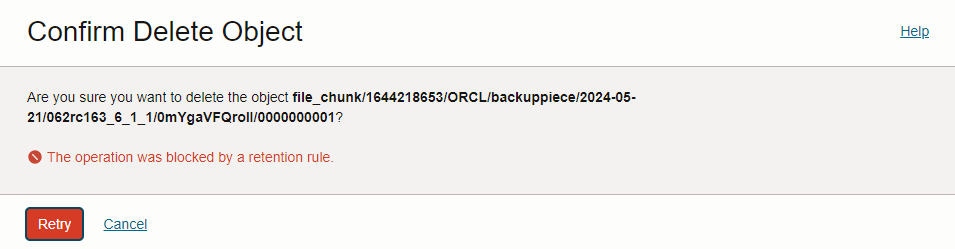
Deleting the backup will fail as it’s blocked by the Object Storage bucket retention rule.
Delete via RMAN:
RMAN> delete backup tag full23;
...
RMAN-03009: failure of delete command on ORA_SBT_TAPE_1 channel at 05/21/2024 13:59:18
...
KBHS-00719: Error 'RetentionRuleViolation'; The operation was blocked by a retention rule.
Delete via Cloud Console:
Considerations
- Your databases may have different backup retention requirements. As a best practice, Oracle recommends maintaining a separate immutable bucket and a corresponding temporary metadata bucket for each database.
- The archive storage tier might be more cost-effective only if you store data for longer than 90 days, as the archive storage tier charges for at least 90 days. Hence, it usually makes sense only for long-term retention full backups with a longer retention period.
- Always use the standard storage tier for the temporary bucket, as metadata files are stored during backup operations and then deleted afterward.
- Ensure that the RMAN retention policy is longer than the immutable backup retention rule. Otherwise, RMAN will run into an error while trying to delete an expired backup.
- Set the immutable bucket retention rules appropriately. Keep in mind that retention can only be increased, not decreased. If you want to delete your data, you must wait until the retention expires.
Conclusion
For Oracle databases running on Oracle Cloud, configure the recommended automated backups to Autonomous Recovery Service with immutable backups by default. For Oracle databases running on-premises or non-Oracle Clouds, the Oracle Database Cloud Backup Module for OCI allows you to store your RMAN backups directly into the OCI Object Storage. Use OCI Object Storage immutable buckets to protect your data from accidental deletion and being able to restore your data in case it’s needed.
 Database Heartbeat