
Introduction
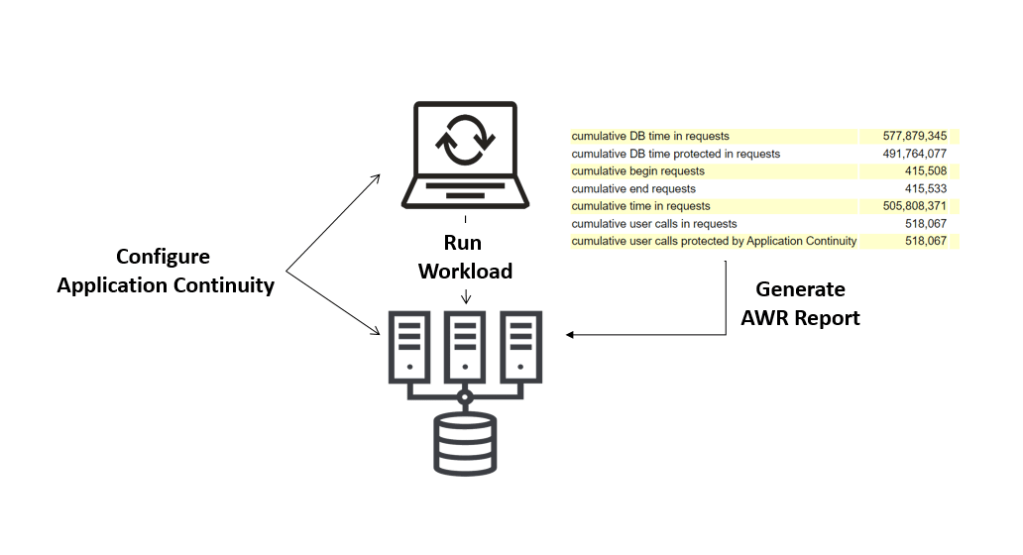
Oracle provides the Checklist for Application Continuity alongside many other resources to get you started with Application Continuity. After completing the configuration at the database and application side, the question is how to verify whether your application calls are protected by Application Continuity? This information can be easily found in the AWR report.
The Environment
- Oracle RAC Database 19.17 running on BaseDB service on Oracle Cloud.
- Swingbench application running in a compute VM on Oracle Cloud to generate a workload.
Run Your Application
Start your workload by running your application connecting to the database using an Application Continuity-enabled service as described in the checklist mentioned above:
srvctl add service -db <db_unique_nam> -pdb <pdb_name> -service <service_name> -preferred <instance_name> -available <instance_name> -stopoption IMMEDIATE -notification true -drain_timeout 300 -commit_outcome true -retention 86400 -replay_init_time 600 -session_state DYNAMIC -failover_restore LEVEL1 -failovertype TRANSACTION
Use the recommended connection string configured for high availability:
Alias = (DESCRIPTION = (CONNECT_TIMEOUT=90)(RETRY_COUNT=50)(RETRY_DELAY=3)(TRANSPORT_CONNECT_TIMEOUT=3)
    (ADDRESS_LIST = (LOAD_BALANCE=ON)
        (ADDRESS = (PROTOCOL=TCP)(HOST=primary-scan)(PORT=1521)))
    (ADDRESS_LIST = (LOAD_BALANCE=ON)
        (ADDRESS = (PROTOCOL=TCP)(HOST=secondary-scan)(PORT=1521)))
    (CONNECT_DATA = (SERVICE_NAME=gold-cloud)))
Generate an AWR Report
Follow the documentation to generate an AWR Report:
SQL> @?/rdbms/admin/awrrpt;
In Oracle RAC environments, generate a global AWR report using the awrrpti script:
SQL> @?/rdbms/admin/awrrpti;
You can create specific snapshots just before and after running your workload.
SQL> EXEC dbms_workload_repository.create_snapshot;
The duration of your workload depends on your application. For an application that is running continuously, check the AWR reports for a longer period of time, e.g. one day, on different days of the week.
Check the AWR Report
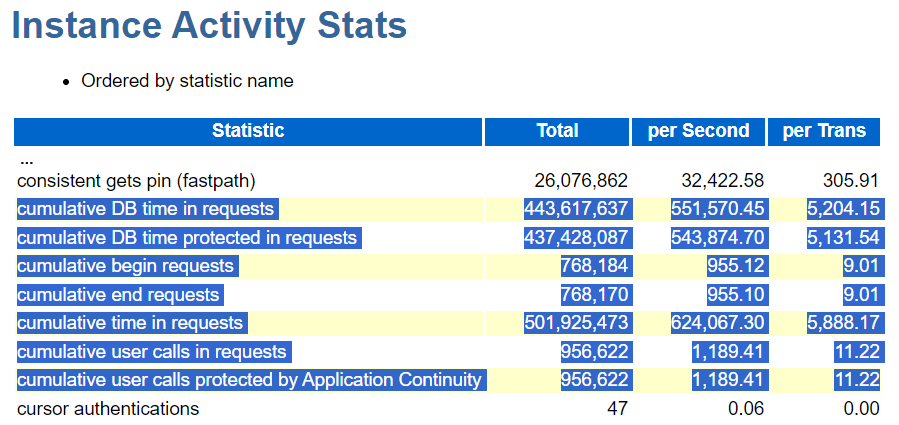
The AWR report contains the following statistics in the Instance Activity Stats section that we will cover in the next section:
- cumulative DB time in requests
- cumulative DB time protected in requests
- cumulative begin requests
- cumulative end requests
- cumulative time in requests
- cumulative user calls in requests
- cumulative user calls protected by Application Continuity
Analyze the AWR Report
If you don’t see the begin request and end request statistics, this means either your connection pool is not configured correctly, or the application is not returning the connections to the pool. In this case, review your connection pool configuration.

If the number of user calls protected is zero, then Application Continuity is not enabled.

If the number of user calls protected is low, then Application Continuity is enabled, but most of the calls are not protected. Check whether you are using the replay driver and use the Application Continuity Protection Check (ACCHK) that was released in 19.11 RU to see the reasons for the low protection level.
All the above can be checked without interrupting the database operation.
Successful and Rejected Replays
When a maintenance or failure event occurs and Application Continuity kicks in to replay interrupted in-flight requests, you will see the following additional statistics in the AWR report:
- successful replays by Application Continuity
- rejected replays by Application Continuity

In my demo, I terminated the SMON process of instance #2 to simulate an instance failure. The AWR report of instance #1 shows only successful replays. This means that all interrupted requests on instance #2 were successfully replayed on instance #1. This matches the statistics showing the number of protected requests is equal to the number of all requests:

Make sure to take the AWR report from the survived instance. In my case, instance #1. If you try it from instance #2, which was interrupted, you will get an error:
ORA-20200: The instance was shutdown between snapshots 9 and 10
Conclusion
Enabling Application Continuity requires configurations on the database and application side. AWR Reports provide a very simple way to check if your application calls would replay successfully by Application Continuity in case of an interruption. You can also set the number of protected calls in relation to total calls.
If the number of protected calls is low, use ACCHK to evaluate the reasons for the low protection and take action accordingly to increase the protection level.
If Application Continuity kicks in after a maintenance or failure event, the AWR report will additionally include the statistics for successful and rejected replays.
Further Reading
- Documentation: Continuous Availability for Applications
- Get started with Oracle Application Continuity
- How to create Oracle Database Services for High Availability
- A Java Example for Oracle Application Continuity with Oracle RAC
- How Draining and Application Continuity Work for Maintenance with Oracle RAC
- An unexpected error occurred. Please try again later
 Database Heartbeat