

Introduction
You can create a database link in the Oracle Autonomous Database to another Autonomous Database, to an Oracle Database that is not an Autonomous Database, or to Non-Oracle Databases. See the documentation for more details.
This blog post shows how to create a database link from an Oracle Autonomous Database on Oracle Database@Azure to an Oracle Database that is not an Autonomous Database, e.g., your Oracle Database running on-premises or on an Azure VM.
Database links might be feasible to query and move a small amount of data between databases. For database migrations to Oracle Database@Azure, please check the Oracle Zero Downtime Migration (ZDM) step-by-step guides.
Prerequisites
Network connectivity must be set up between your Azure VNet and on-premises data center using Azure Express Route or site-to-site VPN. Refer to the Microsoft Azure documentation for more details.
Create a Database Link
Creating a database link on Autonomous Database on Oracle Database@Azure works the same way as creating the database link on Autonomous Databases running on Oracle Cloud.
Step 1: Create Credentials
In the Autonomous database, create a credential for your on-premises database username and password. These are the credentials to be used for the database link:
SQL> BEGIN
 DBMS_CLOUD.CREATE_CREDENTIAL(
 credential_name => 'ONPREM_CREDENTIAL',
 username => 'SYSTEM',
 password => 'VerySecretPW__2024'
 );
END;
/

PL/SQL procedure successfully completed.
Step 2: Create the Database Link:
SQL> BEGIN
 DBMS_CLOUD_ADMIN.CREATE_DATABASE_LINK(
 db_link_name => 'DBLINK_TO_ONPREM',
 hostname => 'oradbhost.onpremises.datacenter',
 port => '1521',
 service_name => 'orclpdb',
 ssl_server_cert_dn => NULL,
 credential_name => 'ONPREM_CREDENTIAL',
 directory_name => NULL,
 private_target => TRUE);
END;
/

PL/SQL procedure successfully completed.
The hostname parameter in the CREATE_DATABASE_LINK must be resolved from the Autonomous Database. Using an IP address is not possible when the target is on a private endpoint.
For the Autonomous Database to resolve the hostname on-premises (or on your Azure VM), we must add a Private DNS Zone and an A-record into the OCI DNS Resolver. For that, before creating the database link, we need to go back to step 0.
Step 0: Create a DNS Zone and an A-record in OCI
Follow these steps to create an A-record in OCI DNS to resolve the hostname of your target database host:
1. From your Oracle Autonomous Database page in the Azure Portal, click on the Go to OCI link.
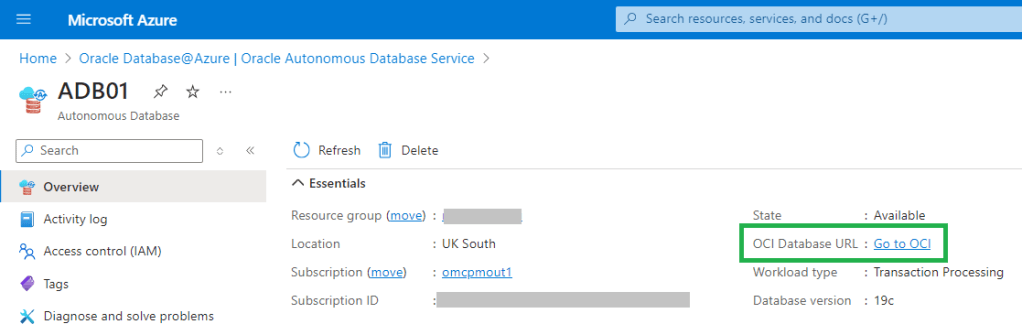
This will take you to the Autonomous Database details page in OCI.
2. Click on the virtual cloud network in the Network section.
3. On the network details page, click on the DNS Resolver.
4. On the private resolver details page, click on the default private view.
5. Click the create zone button and create a new zone using the name of your DNS zone, in this example: onpremises.datacenter.

6. Click on the newly created zone, Manage records, and Add record. Create a record for your target database hostname and IP address. In this example oradbhost and 10.10.0.1:

After adding the record, it will appear in the records list:

7. Click on the Publish changes button to publish the changes
Step 3: Test the Database Link
Query the database name of your target database:
SQL> SELECT NAME FROM V$DATABASE@DBLINK_TO_ONPREM;

NAME
---------
orclpdb
Considerations
If the OCI tenancy is a new tenancy created within the Oracle Database@Azure provisioning process, there might be a need to increase the limits for OCI private DNS and A records. To increase the limits, open a Service Request with Oracle Support. A limit of at least three records is needed.
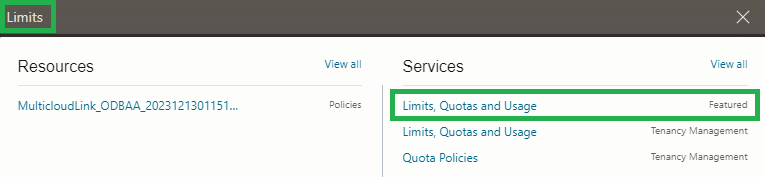
In the OCI Console, search for “Limtis” and click on “Limits, Quotas and Usage”:
Click on the Request a service limit increase button:
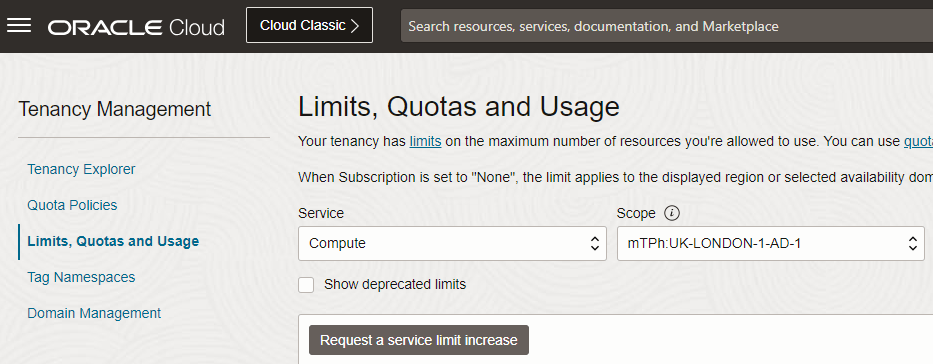
Follow the process for increasing the limits for the DNS zone and three A records.
Conclusion
Creating a database link in Oracle Autonomous Database on Oracle Database@Azure works the same way as creating the database link on any other Oracle Autonomous Database.
For target database hosts with private endpoint, a hostname must be used in the CREATE_DATABASE_LINK procedure. For the Oracle Autonomous Database on Oracle Database@Azure to resolve that hostname, a DNS A-record must be created in the OCI DNS zone beforehand.
Further Reading
- Use Database Links with Autonomous Database – Autonomous Database documentation
- Setting Up Database Link Transfer Method – ZDM documentation
- Migrate to Oracle Database@Azure – ZDM step-by-step guides
 Database Heartbeat