

Introduction
Oracle Application Continuity hides database interruptions from end-users and applications. A simple test using SQL*Plus was discussed in this blog post. However, SQL*Plus is usually not your real application that will be used in production. Also, SQL*Plus is not a pooled application, and it’s recommended to use Connection Pools for Application Continuity.
This blog post provides a simple Java example using a JDBC driver with Universal Connection Pool (UCP) for a quick start connecting to Oracle Active Data Guard. Application Continuity requires the Oracle RAC or Oracle Active Data Guard option license.
Refer to the official Oracle documentation at the end of this post for a complete list of recommendations for your production implementations.
The Environment
- Oracle Active Data Guard version 19.17 and Grid Infrastructure 19.17 running on Oracle Cloud.
- Java JDK 11.
- Eclipse IDE for Java Developers on my local Windows PC.
Database Side
Check the Data Guard Configuration
Log in to the Data Guard broker and check the configuration:
[oracle@londonhost1 ~]$ dgmgrl / as sysdba
DGMGRL> show configuration

Configuration - CDB01_lhr_ad1_CDB01_lhr26k

  Protection Mode: MaxAvailability
  Members:
  CDB01_lhr_ad1 - Primary database
    CDB01_lhr26k  - Physical standby database

Fast-Start Failover:  Disabled

Configuration Status:
SUCCESS   (status updated 17 seconds ago)
Create Database Service
Create a custom role-based database service on the primary and standby as follows:
#on primary
[oracle@londonhost1 ~]$ srvctl add service -db CDB01_lhr_ad1 -pdb PDB01 -service acsrv.oracle.com -stopoption IMMEDIATE -replay_init_time 600 -retention 86400 -drain_timeout 10 -notification TRUE -commit_outcome TRUE -failover_restore LEVEL1 -failovertype TRANSACTION -role PRIMARY

[oracle@londonhost1 ~]$ srvctl start service -db CDB01_lhr_ad1 -service acsrv.oracle.com

#on standby
[oracle@londonhost2 ~]$ srvctl add service -db CDB01_lhr26k -pdb PDB01 -service acsrv.oracle.com -stopoption IMMEDIATE -replay_init_time 600 -retention 86400 -drain_timeout 10 -notification TRUE -commit_outcome TRUE -failover_restore LEVEL1 -failovertype TRANSACTION -role PRIMARY
Application Continuity is enabled by -failover_restore LEVEL1 -failovertype TRANSACTION.
The service is started only on the primary. After a switchover or failover, the service will be started automatically on the remote side after becoming the primary.
Create Database User
Create a user and a simple table for testing:
[oracle@londonhost1 ~]$ sqlplus / as sysdba

SQL> alter session set container=pdb01;
Session altered.

SQL> create user acusr identified by VerySecretPW__2023 quota unlimited on users;
User created.

SQL> grant connect to acusr;
Grant succeeded.

SQL> create table acusr.actab (text varchar2(128));
Table created.
Enable Fast Application Notification (FAN)
The FAN port, usually 6200, must be opened on the database side:
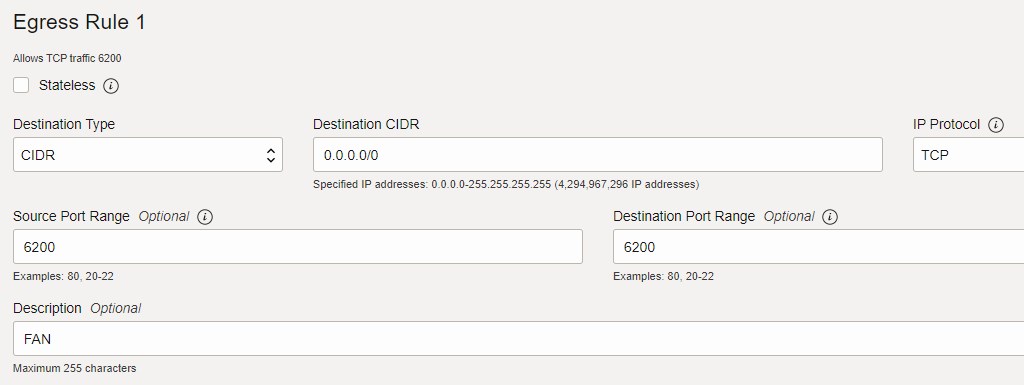
On the client side, FAN is auto-configured out of the box starting with Grid Infrastructure 12c, Oracle Database 12c, and Oracle client 12c when using the recommended connection string. See below.
Client Side
Install JDK
If you are always using Java, you should have the JDK already in place. If you are new to Java:
For Windows, follow the installation as described here.
For Linux, you can follow the installation guide or use yum:
sudo yum install java-11-openjdk
Install Eclipse IDE for Java
If it’s not your favorite (yet) and you want to try it out, you can download it here.
For Windows, follow the installation instructions.
For Linux, simply unzip and execute the binary:
tar -zxvf eclipse-java-2022-12-R-linux-gtk-x86_64.tar.gz
chmod 744 eclipse
./eclipse
Download JDBC and UCP .jar Libraries
Download the zipped JDBC driver (ojdbc11.jar) and Companion Jars file ojdbc11-full.tar.gz from the JDBC and UCP download page.
Extract the zip file and add the following JAR files to your application’s CLASSPATH:
- ons.jar, ojdbc11.jar, and ucp11.jar
In Eclipse, right-click on your project name, then Build Path, and Configure Build Path…:

Select Libraries, Classpath, click on Add External Jars…, select the .jar files mentioned above from the directory where you extract the zip file, and click Apply and Close:

Java Example
Create a new Java Class (AC.java) with the following example code:
import java.io.FileInputStream;
import java.io.InputStream;
import java.sql.Connection;
import java.sql.Statement;
import java.util.Properties;

//PoolDataSource
import oracle.jdbc.OracleConnection;
import oracle.ucp.jdbc.PoolDataSourceFactory;
import oracle.ucp.jdbc.PoolDataSource;

public class AC {

	public static void main(String[] args) {
		usePoolDataSource();
	}

	public static void usePoolDataSource() {
    	try {
    		//use Universal Connection Pool (UCP)
    		PoolDataSource pds = PoolDataSourceFactory.getPoolDataSource();
    		pds.setConnectionFactoryClassName("oracle.jdbc.datasource.impl.OracleDataSource");
    		pds.setConnectionPoolName("JDBC_UCP");
    		//pds.setInitialPoolSize(10);
    		pds.setMinPoolSize(4);
    		pds.setMaxPoolSize(20);

    		//load properties
    		String PROP_FILE = "C:\Users\SPETRUS\Documents\spetrus\development\java\ACproject\src\config.properties";
    		InputStream propInput = new FileInputStream(PROP_FILE);
    		Properties prop = new Properties();
    		prop.load(propInput);

	        //set properties
	        System.setProperty("oracle.net.tns_admin", prop.getProperty("tns_admin"));
	        pds.setURL("jdbc:oracle:thin:@"+prop.getProperty("tns_alias"));
	        pds.setUser(prop.getProperty("db_user"));
	        pds.setPassword(prop.getProperty("db_password"));

	        //enable FAN and connection tests
    		pds.setConnectionWaitTimeout(3);
    		pds.setFastConnectionFailoverEnabled(true);
    		pds.setValidateConnectionOnBorrow(true);

    		//disable auto-commit
	        pds.setConnectionProperty(OracleConnection.CONNECTION_PROPERTY_AUTOCOMMIT, "false");
	        pds.setConnectionProperty(OracleConnection.CONNECTION_PROPERTY_IMPLICIT_STATEMENT_CACHE_SIZE, "100");

	        //get connection from the pool
	        Connection conn = pds.getConnection();
	        //conn.beginRequest(); //not needed, as connection pool sets explicit begin request boundary at getConnection()
		    conn.setAutoCommit(false);

		    //execute query
		    Statement stmt = conn.createStatement();
		    String insert = "insert into acusr.actab values ('Using Application Continuity')";
		    int result = stmt.executeUpdate(insert);
		    System.out.println("insert result is: " + result);
		    //stop here in bedug mode & (relocate | switchover | terminate the session)
		    conn.commit();
		    //conn.endRequest(); //not needed, as connection pool sets explicit end request boundary at close()
	        conn.close();
	        conn=null;
    	}
	    catch (Exception e) {
			e.printStackTrace();
		}
    }
}
The config.properties file contains the following values in my case:
tns_admin=C:\Users\SPETRUS\Documents\spetrus\development
tns_alias=acsrv
db_user=acusr
db_password=VerySecretPW__2023
For testing, you can also put the values directly in the code instead of using a properties file.
Connection String
Use the following recommended connection String in the tnsnames.ora file in the TNS_ADMIN directory:
ACSRV =
	(DESCRIPTION = (CONNECT_TIMEOUT=90)(TRANSPORT_CONNECT_TIMEOUT=3)(RETRY_COUNT=50)(RETRY_DELAY=3)
		(ADDRESS_LIST=(FAILOVER=ON)(LOAD_BALANCE=OFF)
			(ADDRESS=(PROTOCOL=TCP)(HOST=132.145.41.207)(PORT=1521))
			(ADDRESS=(PROTOCOL=TCP)(HOST=132.145.52.177)(PORT=1521))
		)
		(CONNECT_DATA=(
			SERVICE_NAME=acsrv.oracle.com)
		)
	)
ADDRESS_LIST contains the primary and standby hosts. Use SCAN if your primary and standby are RAC databases.
Time to Test
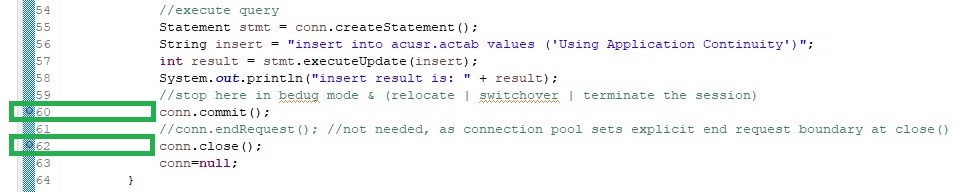
Set two break points before the commit executes and before the end of the request:
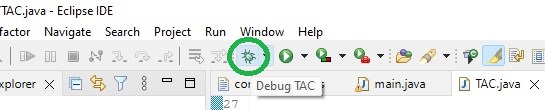
Execute in Debug mode:
The program will stop before the commit executes:

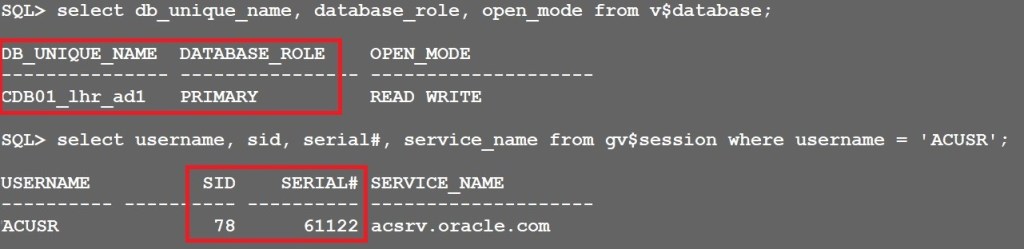
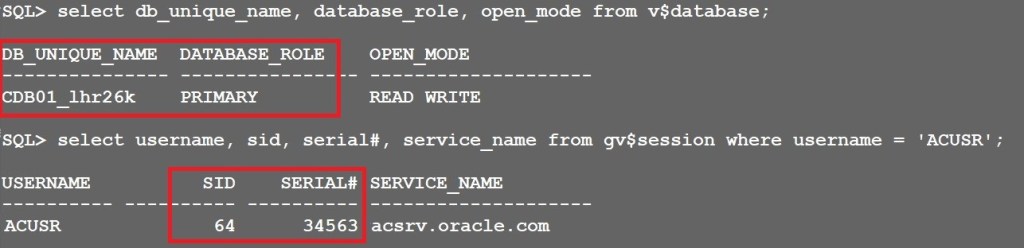
At this point, log in to the primary database and query the existing session for the user ACUSR:
set lines 300
col db_unique_name for a15
col username for a10
col service_name for a20

SQL> select db_unique_name, database_role, open_mode from v$database;

SQL> select username, sid, serial#, service_name from gv$session where username = 'ACUSR';
The user is connected to the primary database CDB01_lhr_ad1:
Now switchover to the standby database using Data Guard broker:
DGMGRL> switchover to CDB01_lhr26k;
Optionally, you can use the WAIT option to specify the drain timeout:
DGMGRL> switchover to CDB01_lhr26k WAIT 30;
If no value is specified for the WAIT option, the Data Guard broker waits for the amount of time specified by the maximum configured drain_timeout amongst all active services.
Wait until the drain timeout specified passes and the switchover is in progress:
Performing switchover NOW, please wait...
New primary database "CDB01_lhr26k" is opening...
Oracle Clusterware is restarting database "CDB01_lhr_ad1" ...
Back to Eclipse, resume the execution:

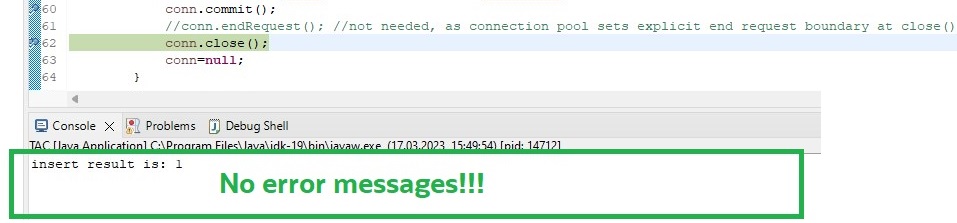
The execution hangs for a short period of time until the standby is promoted to the new primary database. After that, the execution continues and stops at the next break point.
Most importantly, the application continued without getting any error messages, even though the service was stopped meanwhile:
Connect to the new primary database:
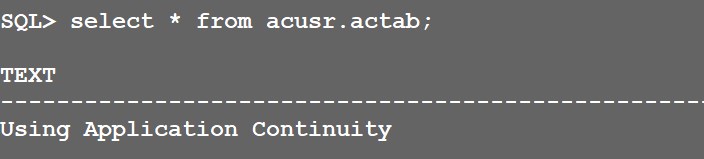
The commit was successfully completed without any interruption for the application:
The role-based custom database service was automatically started on the new primary host:
#on new primary host
[oracle@londonhost2 ~]$ srvctl status service -db cdb01_lhr26k -service acsrv.oracle.com
Service acsrv.oracle.com is running on instance(s) CDB01
Conclusion
Oracle Application Continuity hides database interruptions from end-users by replaying in-flight transactions on available database instances, completely transparent to end-users and without any application code changes needed.
The Java code provided is an example to get you started using Oracle Application Continuity with Java. For production implementations, please follow the instructions and recommendations provided by Oracle.
Further Reading
- Application Continuity for Java – JDBC Developer’s Guide
- Ensuring Application Continuity – Universal Connection Pool Developer’s Guide
- Application Checklist for Continuous Service with Autonomous Database on Shared Infrastructure
- Best Practices for Applications Using Autonomous Database – Dedicated
- Application Checklist for Continuous Service for MAA Solutions
- Best Practices for Adopting Transparent Application Continuity
- Application Continuity for the Oracle Database
- Oracle JDBC Drivers – What JDBC driver version to choose
- Java Development with Autonomous Transaction Processing Dedicated (ATP-D)
 Database Heartbeat